AppGrowing MCP Installation Guide
Connect AppGrowing Global ad intelligence to your Agent via MCP (Model Context Protocol) over HTTP. This page covers connection info, the 21-tool overview, key parameters, and FAQ (Frequently Asked Questions).
1Connection
Connect to AppGrowing Global ad intelligence via MCP over HTTP. Below are the core connection parameters, how to get your API Key, and a config snippet you can hand directly to an Agent.
| Item | Value |
|---|---|
| Endpoint URL | https://api-appgrowing-global.youcloud.com/mcp |
| Protocol | MCP over HTTP (Streamable HTTP), JSON-RPC 2.0 |
| Auth | Authorization: Bearer <API_KEY> |
| API Key | Provided by AppGrowing; replace <API_KEY> at integration time Get your API Key |
| Headers | Content-Type: application/json + Accept: application/json, text/event-stream + accept-language: en |
| Response format | SSE (streamed line by line; JSON follows the data: prefix) |
1.1 Getting the API Key
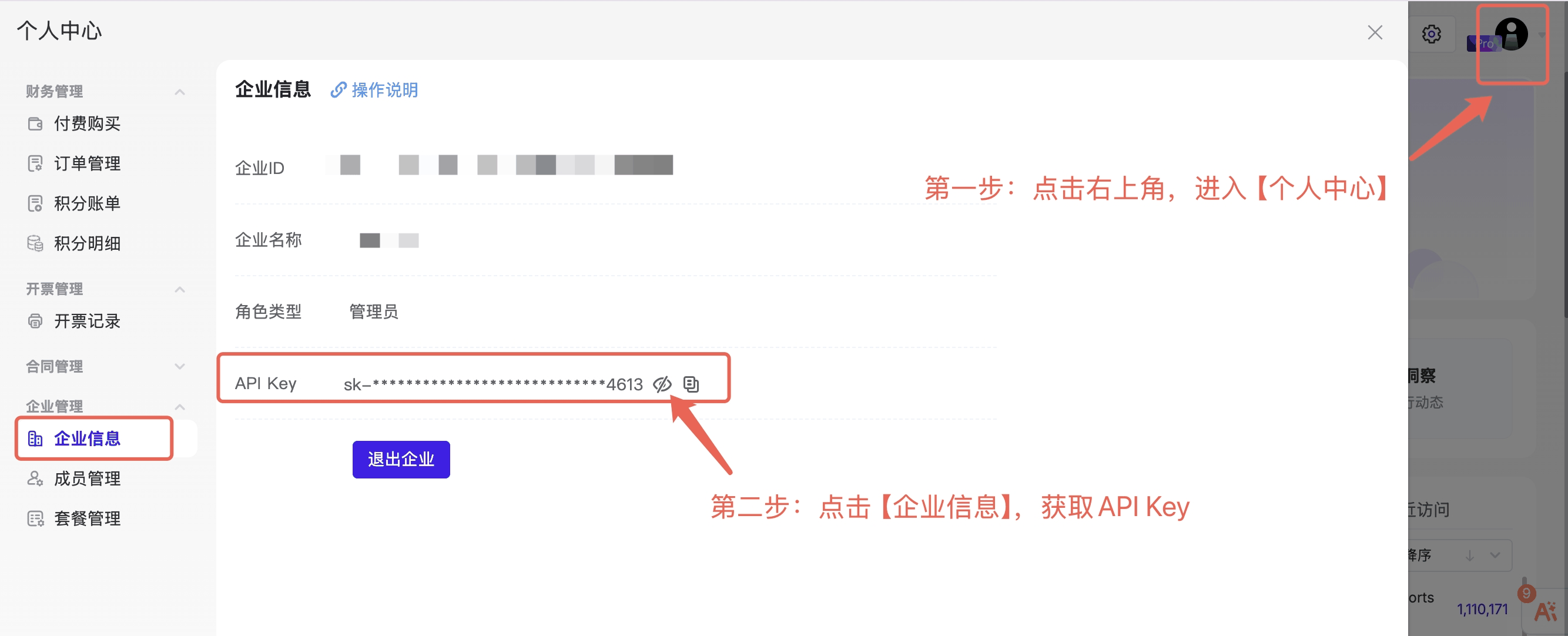
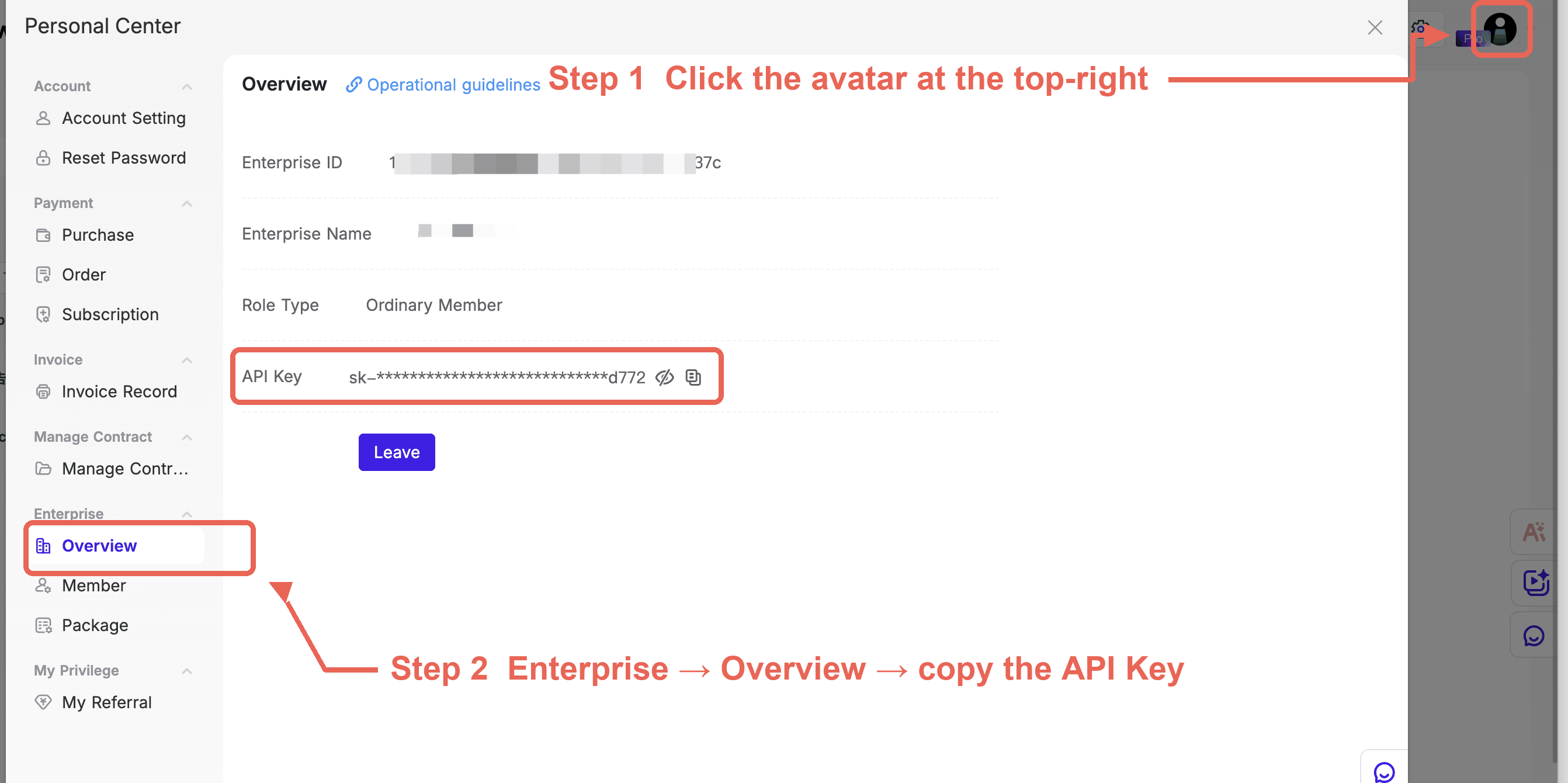
The API Key starts with sk_. Copy it in AppGrowing Global under Personal Center → Enterprise → Overview.
1.2 Config Example
Standard MCP client config (mcpServers):
{
  "mcpServers": {
    "AppGrowing-Global-MCP": {
      "url": "https://api-appgrowing-global.youcloud.com/mcp",
      "headers": {
        "Authorization": "Bearer <API_KEY>",
        "accept-language": "en"
      }
    }
  }
}
Send the block below to your Agent in one piece (replace <API_KEY> with your API Key first) — it will write the config into the matching client config file and complete the install:
Install this MCP:
{
  "mcpServers": {
    "AppGrowing-Global-MCP": {
      "url": "https://api-appgrowing-global.youcloud.com/mcp",
      "headers": {
        "Authorization": "Bearer <API_KEY>",
        "accept-language": "en"
      }
    }
  }
}
🔒 An API Key is a login credential — never commit it to git. Before writing it into a script or a config file, make sure that file is covered by
.gitignore.
221 Tools Overview
AppGrowing Global MCP now exposes 21 tools, organized into four modules by use case: Creative Search & Selling Points (4), Charts Intelligence (3), App Advertising Analysis (11), and Publisher & Developer Intelligence (2), plus a Basic Tool (1).
2.1 Creative Search & Selling Points (4)
| Tool | Purpose | Credits / call |
|---|---|---|
searchAdCreatives | Creative search — filter by media, region, selling point, audience, and monetization method, etc. | 10,000 |
creativeSellingPointTrends | Creative selling-point trends — a 300,000+ lexicon, sorted by number of creatives, advertisements, or popularity. | 10,000 |
creativeAIAnalysisData | Pull a creative's narration, selling points, and AI interpretation, up to 100 per call. | 50,000 |
creativeResourceUrl | Get the download link for a creative's original video/cover (the link has a validity period). | 10,000 |
2.2 Charts Intelligence (3)
| Tool | Purpose | Credits / call |
|---|---|---|
appAdRankings | App promotion ranking at the brand level — includes live ad count, creative count, audience profile, and publisher/developer IDs. | 10,000 |
appStoreDownloadRankings | iOS App Store download chart. | 10,000 |
googlePlayDownloadRankings | Google Play download chart. | 10,000 |
2.3 App Advertising Analysis (11)
| Tool | Purpose | Credits / call |
|---|---|---|
adVolumeTrends | Daily volume trend data for ads and creatives. | 10,000 |
regionOverview | Regional overview — volume and share by country/region. | 10,000 |
regionTimeline | Regional timeline — how each market's volume changes over time. | 10,000 |
mediaOverview | Media mix overview — volume and share by media channel. | 10,000 |
mediaTimeline | Media timeline — how each channel's volume changes over time. | 10,000 |
adFormatOverview | Ad-format overview — playable, rewarded, in-feed, and other formats. | 10,000 |
creativeTypeOverview | Creative-type overview — image, video, and vertical-video distribution. | 10,000 |
creativeFormatRatio | Aspect-ratio overview — portrait, landscape, and size distribution. | 10,000 |
audienceBreakdown | Audience by age × gender. | 10,000 |
appLifecycle | Product lifecycle, version, and festival milestone timing. | 10,000 |
similarApps | Similar / related products — sortable by similarity or lifetime downloads. | 10,000 |
2.4 Publisher & Developer Intelligence (2)
| Tool | Purpose | Credits / call |
|---|---|---|
developerAppOverview | Products under a developer. | 10,000 |
publisherAppOverview | All products under a publisher — live ads, creatives, running days, version count, and region count. | 10,000 |
2.5 Basic Tool (1)
| Tool | Purpose | Credits / call |
|---|---|---|
filterOptions | Filter options: return all selectable filter values (media, region, category, style, selling-point category, etc.) | 10,000 |
Credits are charged per call, regardless of the number of rows returned or pagination.
3Key Parameters
searchAdCreatives is the most-used creative retrieval tool. Below are its key inputs and return fields.
3.1 Required
purpose: 1=game / 2=app / 3=websiteorder: sort (impression_inc_2y_descby impressions desc /max_dt_descby most recent)
3.2 Common Filters
| Param | Type | Example |
|---|---|---|
startDate / endDate | string | 2026-07-10 ~ 2026-08-10 |
category | int array | [2001] RPG / [2009] Card |
appStyle | int array | [20304] Card-Battle / [21204] Anime |
area | string array | ["JP"] Japan / ["US"] USA |
media | int array | [13] TikTok / [2] Facebook |
keyword + accurateSearch | string / int | pass the keyword; accurateSearch=1 for exact match |
searchDsl | array | [{"key":"campaign_name","type":"contain","value":"app name"}] field-level search (key: campaign_name/slogan/asr/developer_name, etc.; type: contain/exclude/equal/notEqual) |
language | string array | ["ja"] Japanese |
videoTime | int | filter by video duration |
3.3 Return Fields
- Creatives reside in
data.materialList'sdataarray; the core of each item is in thematerialfield material.campaign[0].name= game namematerial.creative.slogan= ad copymaterial.creative.type= creative type (102 image / 201 landscape video / 202 portrait video / 203 fullscreen video)material.creative.resource[0].path= direct creative URL (carries auth_key, downloadable directly); same node also has poster / width / height / durationmaterial.creative.resource[0].id= resource ID (passed to creativeResourceUrl / creativeAIAnalysisData)material.format= list of ad formats (array of objects, each with id and name, e.g.[{"id":301,"name":"video interstitial"},{"id":302,"name":"rewarded ad"}], meaning video interstitial + rewarded ad run together). A creative can carry multiple formats; when callingcreativeAIAnalysisData, take any one (recommended: the first) of its ids and align it positionally with idsmaterial.media= media name (string array, multiple media joined by comma)- The response has no delivery-region field; region can only be filtered via the
areainput material.impression_inc_2y= impressions (string format like ">10M")material.cnt_ad_id= number of associated ads
4Solution for Truncated Data
Problem
Data fetching is limited by two constraints stacked on top of each other:
- A single call returns at most
100records: the page size is fixed at100, so pulling the full dataset requires multiple page calls. - Some tools return truncated responses: for content-heavy tools (such as creative search,
100records per page), the response body can exceed the MCP tool layer's ~100KB truncation cap for the Agent context —— once such a response flows back into the Agent context it causes two problems at once: the data is incomplete and the large JSON consumes a lot of tokens (calls with smaller response bodies are unaffected).
Approach (hand this description to your Agent and let it generate the script — no need to write it by hand):
Call the endpoint directly from a script
Skip the MCP client and send JSON-RPC requests straight to the endpoint (endpoint, request headers and SSE response format are in Section 1; read the JSON from the data:-prefixed lines). The response you get this way is the server's complete response, unaffected by the client-side truncation cap.
Loop through the pages
Start at page 1 and turn pages one by one, 100 records per page, until you reach total records or a page returns fewer than 100.
Write raw responses straight to disk
One local file per page, e.g. ./mcp_dumps/search_p1.json; data never goes through the terminal or into the Agent context.
Print only a summary
Just total, the count on this page, and the output path.
Analyse by reading the files
Process the dumped files directly, narrow down to a small sample, then hand that to the Agent.
Environment note
The endpoint uses HTTPS. If the script reports CERTIFICATE_VERIFY_FAILED (certificate chain verification failed), install certifi (pip3 install certifi) and point the script at its certificate.
5FAQ & Notes
| Issue | Solution |
|---|---|
Auth uses Bearer | Use the Authorization: Bearer header; requests must include Content-Type and Accept |
searchDsl's equal may not work | Returns the full set (huge total); use contain instead, or keyword + accurateSearch=1 |
appAdRankings date param frequently returns error 401001 | Use a short date range (e.g. last 17 days) or retry |
publisherAppOverview needs publisher.id | Passing developer.id returns empty |
adVolumeTrends requires brandId | brandId and id cannot both be empty; otherwise an empty trend is returned |
searchAdCreatives has no creativeType param | Filter videos manually after the response by material.creative.type |
The returned media field is a string array | Each material.media element is a media name (multiple joined by comma); the response has no area field |
How to pass format to creativeAIAnalysisData | Take any one (recommended: the first) of the creative's material.format after splitting by comma, and align it positionally with ids; for multi-format creatives any one works |
| Large response data | Call directly from a script and write to disk; keep large JSON out of the context |
| 429 / 500 occasional | Add retries (3 attempts + 2-3s backoff) |
What is the id returned by creativeAIAnalysisData, and how to map it back | It is the material.creative.resource[0].id (resource ID) you passed in — not material.id. The returned array corresponds one-to-one with ids in order, and the returned id equals the input exactly; map each creative back by the returned id. Resource IDs are base64-shaped (end with ==); material.id is a 32-char hex string. If material.creative.resource has multiple elements, each resource ID maps to its own analysis result. |
For integration help, contact AppGrowing Global support.